Mechanic Watercolor Cliparts for Creative Branding
Design assets that blend industrial grit with fluid, painterly texture are rare. Most mechanic-themed graphics lean hard into sharp vector lines, metallic gradients, and rigid iconography. That is exactly why Mechanic Watercolor Cliparts stands apart. It brings a handcrafted, organic feel to a category that usually feels cold. The result is a design resource that works equally well for a rugged auto repair shop’s branding and a whimsical children’s book about trucks.
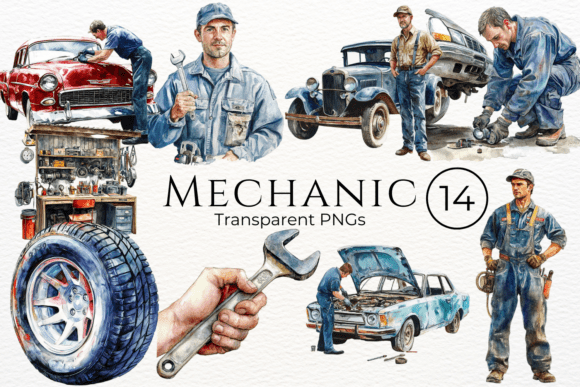
What you get with this collection is a set of watercolor illustrations that capture tools, gears, wrenches, engines, pistons, grease monkeys, and workshop essentials—all rendered with the soft bleeding edges, color pooling, and paper texture that define watercolor as a medium. The mechanic theme is unmistakable, but the execution softens it. Instead of clinical line art, you get blotted ink spreads, uneven saturation, and subtle granulation. That tension between a hard industry and a delicate art form is where the personality lives.
Visual Personality and Stylistic Appeal
The first impression of Mechanic Watercolor Cliparts is warmth. The watercolor washes create depth that flat vectors cannot replicate. A wrench rendered in watercolor feels like it was painted on a garage wall, not drawn in software. The color palette typically leans toward muted greys, deep blues, rust oranges, oil blacks, and occasional pops of red or yellow. These are not saturated, neon-bright hues. They feel aged, weathered, and lived-in—which is exactly the vibe you want for anything related to craftsmanship, restoration, or vintage machinery.
The style sits somewhere between handwritten font spontaneity and display font intentionality. Each clipart piece has its own slight imperfection: paint that bled past the line, a gradient that dried unevenly, a splatter that landed nearby. Those “flaws” are the whole point. In a design landscape saturated with perfect vectors, watercolor imperfections signal authenticity. They say a human made this. That matters when you are building brand identity for a business that values hands-on work.
From a typography and design terminology standpoint, think of these cliparts as the visual equivalent of a serif font with distressed edges or a script font with variable stroke width. They carry history. They feel like they belong on a coffee sack, a leather journal cover, or a chalkboard menu at a diner that also rebuilds carburetors.
Where Mechanic Watercolor Cliparts Delivers the Most Value
Because the style is specific, it is not for every project. But when the context fits, nothing else works as well. Here are the real-world applications where this asset shines.
Branding for Automotive and Workshop Businesses
An independent garage, a custom motorcycle builder, a vintage car restoration shop, or a metal fabrication studio all need brand identity materials that communicate skill and personality. Mechanic Watercolor Cliparts gives you the visual shorthand for tools and machinery without looking like a generic stock vector pack. Use the cliparts on business cards, shop signage, oil change reminder cards, and uniform embroidery. The watercolor texture makes the brand feel established, even if the business just opened.
Packaging Design for Industrial and Lifestyle Products
Think about hand soap for mechanics, tool gift sets, DIY kits for kids, or premium lubricant packaging. A watercolor gear or wrench on the label tells the customer this is a thoughtful product, not a commodity. Packaging design often struggles to balance ruggedness with approachability. The painted look bridges that gap. It says the product is tough but not harsh, functional but not cold.
Editorial and Blog Content
If you publish a magazine about classic cars, a blog about woodworking, or a newsletter for makers, watercolor cliparts add a artisan touch to editorial design. Use them as pull-quote decorations, section dividers, or full-page spot illustrations. The soft edges contrast nicely with body text set in a clean sans serif font, creating visual hierarchy that guides the reader without shouting.
Social Media Graphics and Web Design
Social media feeds are crowded. A watercolor mechanic illustration stands out against the usual flat icons and stock photos. Use the cliparts as hero images for Instagram posts, YouTube thumbnails, or Pinterest pins. On a web design project, drop a watercolor tool illustration behind a headline set in a bold display font. The contrast between the textured background and crisp type creates depth without needing complex CSS effects.
Personal and Hobby Projects
For crafters and hobbyists, Mechanic Watercolor Cliparts is a goldmine. Print them on iron-on transfer paper for T-shirts. Use them in scrapbooks about a car restoration project. Design greeting cards for the gearhead in your life. Because watercolor cliparts have a handmade look, they integrate seamlessly with other craft materials like twine, kraft paper, and wood veneer.
How the Style Influences Readability, Hierarchy, and Brand Perception
Any creative font or design asset carries emotional weight. Mechanic Watercolor Cliparts shifts brand perception in a few specific ways.
Approachability. A garage logo built entirely from sharp vector gears can feel intimidating or cold. Replace one gear with a watercolor version and the entire mark softens. The business still looks skilled, but it also looks friendly. That matters when you want customers to trust you with their vehicle.
Consistency. When you use watercolor cliparts across a website, social media, print collateral, and signage, you establish a cohesive visual language. The watercolor texture becomes a thread that ties everything together. Consistency is one of the hardest things to maintain in brand identity, and a distinctive asset like this makes it easier.
Professionalism. A common misconception is that handmade styles look amateurish. The opposite is true when the execution is good. High-quality watercolor cliparts with proper scan resolution, clean edges, and well-balanced compositions read as intentional and premium font-level polished. They signal that you invested in your presentation.
Audience engagement. People linger longer on textures. A watercolor illustration invites closer inspection. The subtle color variations keep the eye moving across the page. That extra moment of engagement can be the difference between a scroll-past and a click-through.
In terms of visual hierarchy, watercolor cliparts function best as accent elements or secondary focal points. Because they have organic edges and variable opacity, they should not compete with primary text. Pair them with a clean sans serif font for body copy and a strong serif font or script font for headings. Let the clipart breathe with plenty of white space around it.
Practical Guidance for Choosing and Using the Asset
Before you download and drop Mechanic Watercolor Cliparts into a project, take a moment to evaluate fit, licensing, and technical needs.
Evaluate Project Fit
Ask yourself whether the watercolor texture supports your message. If you are designing for a high-end luxury automotive brand with sleek, modern showrooms, watercolor might feel out of place. If you are designing for a neighborhood shop that prides itself on old-school craftsmanship, it is perfect. The cliparts work best for brands that want to emphasize authenticity, heritage, and hands-on skill.
Test Font Pairings Early
Because the cliparts have an organic, painterly look, they pair best with typefaces that offer contrast. Try a sans serif font like Montserrat or Open Sans for clean, modern readability. For headings, a distressed display font with rough edges can echo the watercolor texture without competing with it. A handwritten font also works, but keep it legible—do not pair two messy elements together or the layout will feel chaotic. Create a simple test layout with three font pairing options before committing.
Review Included Styles and Formats
Not all clipart packs are created equal. Check whether Mechanic Watercolor Cliparts includes transparent PNG files, layered PSD files, or high-resolution JPEGs. Transparent files are essential for logo design and web design so you can place the artwork over any background. If the pack includes SVG files, that is a bonus for scaling without quality loss. Also review the color options—some packs offer multiple colorways of the same illustration, which gives you flexibility for different projects.
Readability and Scaling Considerations
Watercolor textures can become muddy when scaled too small. A gear that looks beautiful at 500 pixels wide might turn into an indistinct blob at 50 pixels. Test the cliparts at the sizes you intend to use. For small applications like business card icons or website favicons, consider simplifying the artwork or using a vector alternative. For large applications like posters or banners, watercolor cliparts look spectacular because the texture remains visible and the paint effects have room to breathe.
Commercial Licensing
If you are a designer or small business owner using the cliparts for client work or products, confirm the commercial font license terms (or in this case, clipart license terms). Most reputable packs allow commercial use in both digital and print projects, but some restrict resale of the raw assets. You should be fine using them in logos, packaging, marketing materials, and social media—just read the end user license agreement so you know exactly what is allowed.
Real-World Design Observations
I have seen Mechanic Watercolor Cliparts used in a few standout ways. One was a coffee brand that also restored vintage motorcycles. The packaging used a watercolor engine block behind a bold display font for the product name. The contrast between the rough paint texture and the clean typography made the can instantly recognizable on a shelf. Another example was a children’s picture book about a little girl who fixes her own bicycle. The watercolor tools on each page added visual storytelling that complemented the hand-drawn illustrations.
The common thread in both examples is intentionality. The designers did not use the watercolor cliparts because they were trendy. They used them because the texture communicated something that flat vectors could not: warmth, history, and a human touch. That is the real value of a asset like this. It is not just a picture of a wrench. It is a picture of a wrench that looks like someone painted it in a sunlit garage on a Saturday afternoon. That context changes how people perceive the brand.
If you are building a modern typography system or a brand identity from scratch, consider where handmade elements fit. Watercolor cliparts are one tool in a larger toolkit that might also include a premium font, a serif font for body text, and a script font for accents. The goal is not to use every texture available. The goal is to choose the one texture that makes your message more memorable.
For marketers, publishers, and content creators who work on tight deadlines, the biggest practical advantage is speed. A well-made watercolor clipart requires no additional styling. Drop it into a layout, adjust the scale, and move on. It looks finished because it was finished by the artist who painted it. That saves you hours of trying to fake a textured look with filters and brushes.
Ultimately, Mechanic Watercolor Cliparts is a niche asset with broad application. It works for logos, packaging, editorial, web, social, and personal projects as long as the message aligns with the texture. Evaluate your project honestly, test your pairings early, and use the cliparts as a deliberate accent rather than a decorative afterthought. When you get the combination right, the result is a design that feels both rugged and refined—and that is a balance worth pursuing.